 English
 Español
 Tiếng Việt
 Deutsch
 Français
 Português
 Polski
 Nederlands
 Italiano
 Svenska
 Norsk
 Dansk
 Suomi
 Čeština
 हिन्दी
 العربية

Store each guard’s license in their employee record with its expiration date and the file, and tick the reminder. TimeGO then reminds the guard, starting as many days before expiry as you choose and repeating until the date. It does not remind you, which is the part most owners miss, so the system needs one habit on your side as well.
How licenses usually slip
Most guard companies keep licenses in a spreadsheet or a binder. It works while the person who updates it is in the office. Then that person takes two weeks off in July, three cards expire in the same fortnight, and nobody notices until a client’s auditor asks for copies.
The dates are not the hard part. Remembering to look at them is. So the date belongs next to the document, inside the officer’s record, and the reminder should reach the person who can actually renew.
Add a license to the record
A manager or business admin on the Basic or Pro plan adds the document with its expiration date and file, and ticks the reminder. The help article has every step.
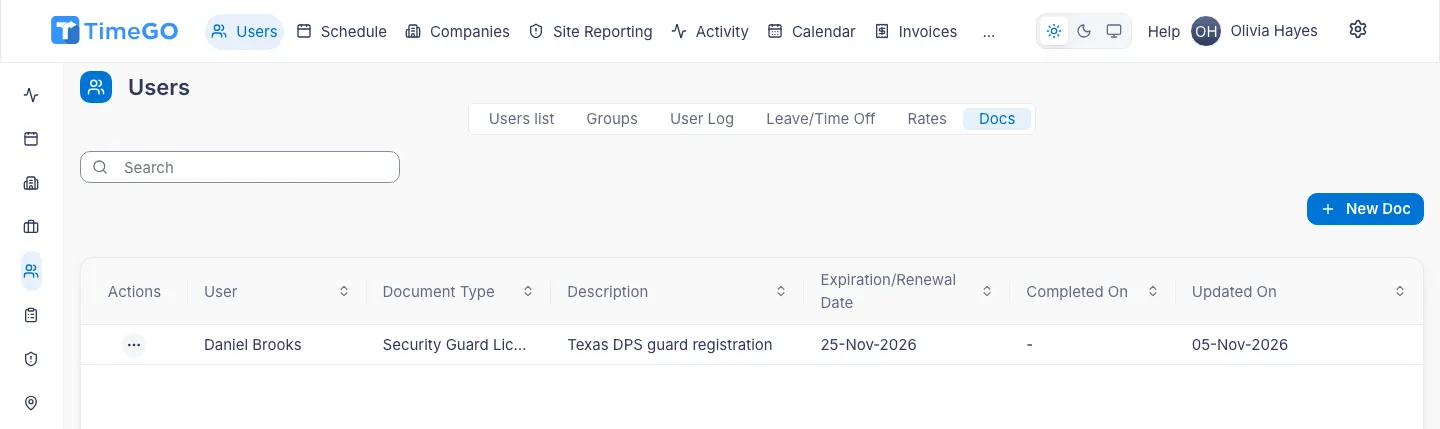
 One row per document, each with its own date. A firearms permit and a first aid card are separate rows from the guard card.
Give every license and certificate that matters its own document, with its own date. The guard card is the obvious one. The ones that catch people out are the second-tier cards that expire on a different cycle.
A missing reminder checkbox usually means the card has already expired, which is a finding in itself.
The employee records page shows the rest of what the record holds.
Who gets the reminder
This is the detail that surprises people:
- The reminder goes to the employee only, as a push notification and as a message in their chat in the app.
- It arrives around 12:00 noon in the employee’s time zone, and repeats on the schedule you picked until the expiration date.
Managers get none, so the system is quiet on your side, and you should not mistake quiet for “all current”.
The check the reminder misses
Put a recurring date on your own calendar, the first Monday of the month for example. Open the Docs tab of each officer, or have your supervisors do it for their posts, and look for any date inside the next 60 days. That gives you time to talk to the officer before the post is at risk, rather than after.
Do the same check when you build next month’s schedule. An officer whose card runs out on the 14th is a scheduling problem for the 15th, and it is easier to solve on the 1st.
Two more habits help:
- Ask new hires to upload their own license on day one from the phone app. A manager can still edit or delete any employee’s documents.
- When an officer renews, replace the date on the same document rather than adding a new one, so the record does not fill with expired rows.
The security guard companies page shows how the records sit next to scheduling and patrols.
What TimeGO does not know
TimeGO stores the date you type and reminds the officer about it. It does not check with any state agency whether a license is valid, it does not know your state’s renewal rules, and it cannot tell you how long a renewal takes where you operate. Treat the date as only as good as the card it came from, and confirm the requirements with your licensing authority. Nothing here is legal advice.
Common questions
Does the manager get a reminder?
No. Reminders go to the employee only. Check the Docs tabs yourself on a fixed day each month.
Can an officer add their own license from the phone?
Yes. The app has an Upload Document option.